
Download FCKeditor – Powerful Web Text Editor, Free, Secure, Cross‑Browser
Overview
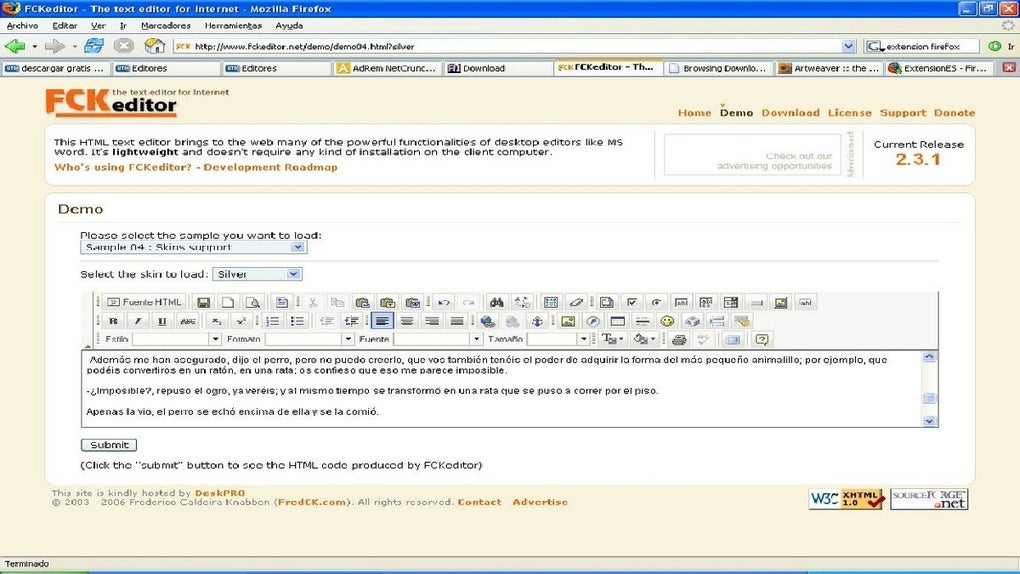
FCKeditor is a robust, open‑source web‑based text editor that brings the full power of a desktop word processor to your browser. Designed for developers who need a reliable, feature‑rich editing component, FCKeditor can be embedded into any website or web application with just a few lines of code. It mimics the familiar interface of Microsoft Office or Open Office, offering users intuitive toolbar buttons for formatting, image handling, table creation, and hyperlink management.
Because the editor works entirely within the web environment, you can also tweak its source code to fit a custom workflow or branding guideline. The output is clean, standards‑compliant XHTML, which guarantees that the content you generate will render consistently across all major browsers, including Internet Explorer, Firefox, Chrome, Safari, and legacy Netscape. In addition to core editing capabilities, FCKeditor supports CSS skinning, allowing you to blend the editor seamlessly with your site’s visual theme.
Importing content from Microsoft Word is a breeze, and the built‑in spell checker helps keep copy error‑free. Whether you are building a content management system, a blog platform, or a collaborative documentation portal, FCKeditor delivers a secure, free, and highly extensible solution for web text creation.
Key Features of FCKeditor
- Rich Text Formatting: Bold, italics, underline, font selection, size, and color controls mimic desktop editors.
- Image Management: Insert, resize, align, and add alternative text to images directly from the toolbar.
- Link Creation & Management: Easy insertion of internal, external, and email links with target and title attributes.
- Table Design: Build tables with custom rows, columns, cell merging, and styling options.
- Word Import: Paste or upload Microsoft Word documents; the editor automatically cleans up the markup.
- Spell Checking: Integrated spell‑check engine that highlights misspelled words and offers suggestions.
- CSS & Skins: Full support for external style sheets and pre‑built skins to match your site’s look and feel.
- XHTML Output: Generates clean, well‑formed XHTML that complies with W3C standards.
- Cross‑Browser Compatibility: Works flawlessly in IE, Firefox, Chrome, Safari, and older Netscape versions.
- Extensible Plugin Architecture: Add custom plugins for media embedding, code highlighting, or workflow integration.
Beyond the listed capabilities, FCKeditor’s modular design means developers can extend or replace individual components without breaking the core functionality. The editor also provides an API for programmatic control, enabling advanced scenarios such as auto‑saving drafts, custom toolbar configurations, and real‑time collaboration. Security is taken seriously; all user‑generated content passes through a configurable sanitization layer to prevent XSS attacks. Because it is released under an open‑source license, you can audit the code, contribute improvements, or fork the project to suit niche requirements. In short, FCKeditor combines the richness of a desktop word processor with the flexibility of a web component, making it a top choice for any web‑based content creation workflow.
Installation & Usage Guide
Getting started with FCKeditor is straightforward, even if you are new to integrating third‑party JavaScript libraries. Follow these steps to download, install, and embed the editor into your web pages:
- Download the Package: Visit the official repository or the download page and click the Download button. The archive contains the core JavaScript files, language packs, skins, and a set of example HTML pages.
- Extract the Files: Unzip the package into a folder within your project, for example
/assets/fckeditor/. Preserve the directory structure; theeditor,skins, andlangfolders are essential. - Include the Core Script: In the HTML page where you want the editor, add the following line inside the
tag: - Create a Textarea Placeholder: Insert a standard
- Instantiate the Editor: Add a short script block after the textarea to replace it with FCKeditor:
- Configure Optional Settings: Open
fckconfig.jsto adjust language, skin, file browser integration, or enable extra plugins. For example, to change the default skin:FCKConfig.SkinPath = '/assets/fckeditor/skins/moonrise/' ;
- Test the Integration: Load the page in your browser. You should see a full‑featured toolbar above the editing area.
Try typing, formatting, inserting an image, and switching to source mode to verify XHTML output.
When deploying to a production environment, it is advisable to minify the JavaScript files and enable gzip compression on the server to improve load times. If you are using a server‑side language like PHP, ASP.NET, or Java, FCKeditor provides ready‑made connector scripts for file uploads and browsing, which you can customize for authentication and storage paths. The editor also offers a robust API for event handling, allowing you to capture OnSave or OnCancel actions and tie them into your own workflow.
By following these steps, you can have a secure, free, and fully functional web text editor up and running within minutes.
Compatibility, Pros & Cons
FCKeditor is a pure client‑side JavaScript component, which means it runs on any operating system that supports a modern web browser—Windows, macOS, Linux, Android, and iOS. The editor has been tested across the following browsers:
- Internet Explorer 11 and later (including Edge mode)
- Mozilla Firefox (latest two major releases)
- Google Chrome (latest two major releases)
- Apple Safari (macOS and iOS)
- Opera (latest stable version)
The underlying XHTML output ensures that content looks identical regardless of the rendering engine, making FCKeditor a safe choice for heterogeneous user bases. Below is a balanced look at the strengths and weaknesses of the software.
Pros
- Free & Open Source: No licensing fees and full source code transparency.
- Rich Feature Set: Provides all essential editing tools without needing external plugins.
- Cross‑Browser Support: Consistent behavior on IE, Firefox, Chrome, Safari, and Opera.
- Customizable Skins & CSS: Match the editor to any site design.
- Word Import & Spell Check: Reduces manual cleanup for content creators.
- Secure Output: Generates clean XHTML and includes sanitization hooks.
- Extensible Architecture: Add plugins for media, code snippets, or custom dialogs.
Cons
- Legacy Codebase: The project’s original name (FCKeditor) dates back to an older generation of web editors; newer alternatives may have more modern UI/UX.
- Limited Real‑Time Collaboration: Out‑of‑the‑box it does not support concurrent editing like Google Docs.
- Documentation Gaps: While comprehensive, some API sections lack up‑to‑date examples.
- File Browser Integration: Requires manual setup of server‑side connectors for secure uploads.
- Mobile Toolbar Experience: The default toolbar can feel cramped on small screens without custom CSS adjustments.
Overall, FCKeditor remains a solid, free option for developers seeking a reliable WYSIWYG editor with a proven track record. Its pros outweigh the cons for most standard web projects, especially when the need for a lightweight, highly customizable tool is paramount.
Frequently Asked Questions
Is FCKeditor still actively maintained?
The original FCKeditor project has been succeeded by CKEditor. While the classic FCKeditor repository receives occasional security patches, most active development now occurs in the CKEditor family. For cutting‑edge features, consider migrating, but the classic version remains stable for existing implementations.
Can I integrate FCKeditor with a PHP backend for image uploads?
Yes. The download package includes a php connector ( fckupload.php ) that handles file uploads securely. You simply need to configure the upload directory, set proper permissions, and adjust the connector to match your authentication logic.
How does FCKeditor handle multilingual content?
FCKeditor ships with language packs for dozens of locales. By setting FCKConfig.DefaultLanguage or enabling AutoDetectLanguage, the editor automatically displays toolbar labels in the user’s language. You can also add custom translations by creating a new language file in the lang folder.
Is the output truly standards‑compliant XHTML?
Yes. FCKeditor generates clean XHTML 1.0 Transitional by default. You can switch to HTML5 by modifying the FCKConfig.OutputXHTML flag in fckconfig.js. The editor also strips disallowed tags and attributes, helping you maintain valid markup.
Can I customize the toolbar layout?
Absolutely. Toolbar configurations are defined in fckconfig.js. You can create named sets (e.g., Basic, Full) or craft a custom set by listing the desired button names in an array. This configuration is passed via oFCKeditor.ToolbarSet during instantiation.
Conclusion & Call to Action
FCKeditor stands out as a dependable, free web text editor that delivers the core functionality of a desktop word processor within the browser. Its extensive feature list, solid XHTML output, and broad cross‑browser compatibility make it a go‑to solution for developers building CMS platforms, intranets, or any web application that demands rich content creation. While newer editors may offer real‑time collaboration or a more modern UI, FCKeditor’s lightweight footprint and ease of integration continue to appeal to projects where stability and customizability are top priorities. If you’re looking for a secure, open‑source editor that can be tailored to match your site’s design and workflow, download FCKeditor today and start enhancing your web content experience.
Download FCKeditor now – free and secure!
FCKeditor provides a solid, feature‑rich editing experience that meets the needs of most web projects. Its open‑source nature and extensible architecture make it a valuable tool for developers seeking control without licensing constraints.







